What Temperature Should A Soldering Iron Be For Electronics: Guide
Using the correct temperature is the difference between a perfect, reliable electrical connection and a ruined circuit board. If your soldering iron is too cold, the solder will not flow properly, leading to weak, brittle connections known as “cold joints.” If the iron is too hot, you risk destroying delicate microchips, burning the flux, or peeling the copper traces right off the fiberglass board.
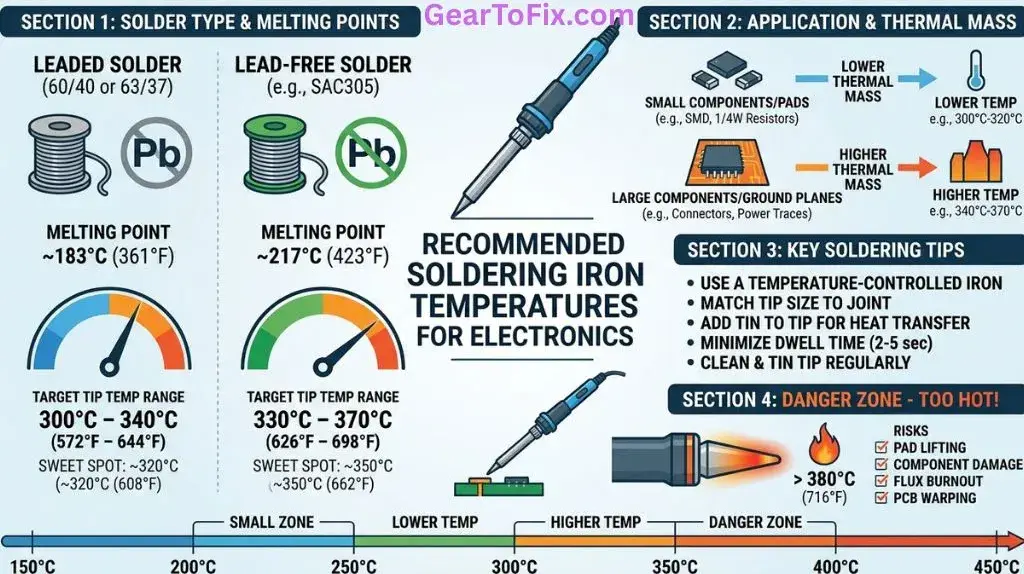
For most electronics work, the ideal soldering iron temperature is 600°F to 700°F (315°C to 370°C) for leaded solder, and 650°F to 700°F (343°C to 370°C) for lead-free solder.
Adjusting within these ranges depends on the type of solder you use, the size of the components, and the design of the circuit board.
Recommended Temperature Ranges
To get clean joints without damaging sensitive components, use the specific temperature ranges below as a starting point:
| Solder Type | Ideal Iron Temperature (Fahrenheit) | Ideal Iron Temperature (Celsius) | Common Applications |
|---|---|---|---|
| Leaded Solder (60/40 or 63/37) | 600°F – 650°F | 315°C – 343°C | Vintage electronics repair, hobbyist prototyping, delicate through-hole work |
| Lead-Free Solder (SAC305 / Copper-Tin) | 650°F – 700°F | 343°C – 370°C | Modern consumer electronics, RoHS-compliant repairs |
| Thick Wires & Large Ground Planes | 700°F – 750°F | 370°C – 400°C | Power jacks, heavy-duty connectors, battery leads, thick ground traces |
How Solder Alloy Choice Affects Your Temperature Setting
The chemical composition of your solder directly determines its melting point, which in turn dictates how hot your soldering iron needs to be.
Leaded Solder (60/40 and 63/37)
Leaded solder is a blend of tin and lead. It is highly favored by hobbyists because it has a lower melting point and flows more easily than modern lead-free alternatives.
- 60/40 solder melts at approximately 370°F (188°C).
- 63/37 eutectic solder melts at exactly 361°F (183°C) and transitions instantly from a liquid to a solid state.
Because you need thermal headroom to rapidly transfer heat from the iron tip to the component lead and PCB pad, set your iron roughly 250°F (120°C) higher than the solder’s melting point. Keeping your iron between 600°F and 650°F provides plenty of heat for leaded solder without putting components at risk.
Lead-Free Solder (SAC305)
Most modern commercial electronics are manufactured using lead-free solder to comply with environmental regulations. The most common alloy is SAC305 (tin, silver, and copper).
- Lead-free alloys melt at higher temperatures, typically around 417°F to 422°F (214°C to 217°C).
- Lead-free solder does not wet (spread) as easily as leaded solder and cools with a duller finish.
To compensate for the higher melting point and slower wetting action, set your soldering station to 650°F to 700°F. Avoid pushing the temperature past 700°F unless you are working on a massive connection, as higher heat accelerates tip oxidation and can quickly burn away the flux before it can clean the joint.
Technical Factors That Influence Heat Delivery
Setting the dial on a soldering station only controls the temperature of the internal heating element. The actual heat delivered to the joint depends on several physical factors.
Thermal Mass of the Joint
The term “thermal mass” refers to the volume of metal you are trying to heat. A tiny surface-mount resistor has very low thermal mass and heats up instantly. A large power jack connected to an internal copper ground plane has high thermal mass; it acts as a heat sink, rapidly pulling heat away from the soldering iron tip.
When working on high thermal mass joints, you do not necessarily need a hotter iron. Instead, you need a larger tip and a station with better thermal recovery.
Tip Shape and Size
Always match the size of your soldering iron tip to the size of the joint.
- Conical tips have a small surface area and are poor at transferring heat.
- Chisel or bevel tips have flat sides that maximize contact area with both the component lead and the PCB pad.
Using a larger chisel tip transfers heat far more efficiently than a needle-thin conical tip, allowing you to solder at a lower, safer temperature setting.
Station Wattage and Heat Recovery
A 15-watt basic pencil iron and a 70-watt adjustable soldering station can both be heated to 650°F. However, the moment the tip touches a cold copper pad, the temperature of the tip drops.
- A low-wattage iron will struggle to recover that lost heat, forcing you to hold the tip against the board for a dangerous length of time.
- A high-wattage, temperature-controlled station detects the temperature drop and immediately pumps more power to the tip, maintaining a stable temperature throughout the joint-making process.
Step-by-Step Guide: Setting and Adjusting Your Soldering Temperature
To achieve clean, shiny solder joints without damaging your hardware, follow this sequence:
- Identify your solder alloy: Determine if you are using leaded or lead-free solder.
- Select the correct tip: Use the largest chisel or screwdriver tip that can comfortably fit on the target joint without touching neighboring components.
- Set the initial temperature: Set your station to 625°F (330°C) for leaded or 675°F (357°C) for lead-free.
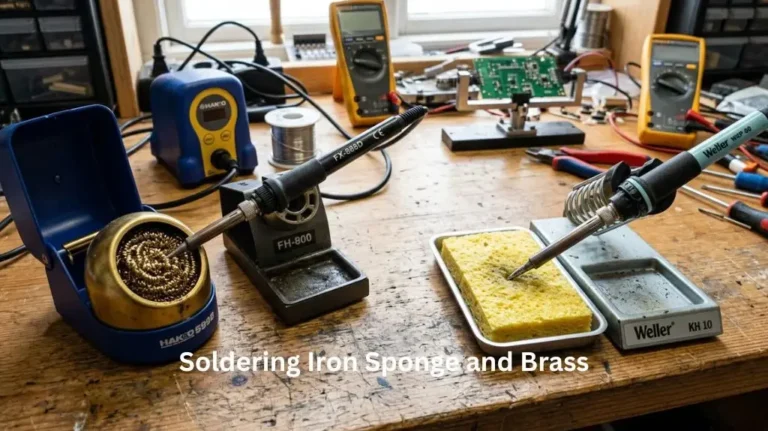
- Clean and tin the tip: Wipe the hot tip on a damp brass wire sponge, then immediately apply a small amount of fresh solder to the tip. This molten layer of solder (called “tinning”) acts as a bridge to conduct heat from the iron to the joint.
- Apply heat to the joint: Touch the tinned tip to both the component lead and the PCB pad simultaneously.
- Feed the solder: After 1 to 2 seconds of contact, feed the solder wire into the joint—not directly onto the iron tip. The heat of the joint should melt the solder.
- Complete the joint quickly: The entire process of heating, feeding solder, and removing the iron should take no longer than 2 to 4 seconds.
If the solder takes more than 3 seconds to melt and flow, do not hold the iron in place. Remove the iron, let the joint cool completely, and increase the temperature by 25°F (14°C), or switch to a larger tip.
Common Soldering Temperature Mistakes to Avoid
- Cranking the heat to compensate for a dirty tip: If your solder is not melting, a common instinct is to turn the iron up to 800°F (426°C). This usually backfires. High heat causes the protective tin coating on the tip to oxidize rapidly, creating a dark barrier of burnt metal and flux that blocks heat transfer. Keep your tip clean and tinned instead of raising the temperature.
- Leaving the iron idle at high temperatures: Leaving your soldering iron sitting in its stand at 700°F for long periods will burn off the tinning and ruin the tip. Turn your station off when not in use, or use a station with an automatic sleep mode.
- Excessive dwell time: “Dwell time” is the duration the hot iron tip rests on the circuit board. Delicate integrated circuits (ICs) and surface-mount components can only withstand high temperatures for a few seconds. Keeping your dwell time under 3 seconds protects sensitive silicon chips from thermal failure.
FAQs About What Temperature Should A Soldering Iron Be For Electronics
What happens if the soldering iron temperature is too high?
When an iron is too hot (above 750°F/400°C for standard work), the adhesive holding the copper traces to the fiberglass circuit board can melt, causing the pads to lift off the board. Excess heat also destroys the flux inside the solder instantly, causing the solder to oxidize, clump up, and lose its ability to flow smoothly.
Why does my solder ball up instead of melting onto the joint?
This usually happens because the component lead or PCB pad has not reached the melting temperature of the solder. The solder melts against the hot iron tip but balls up and refuses to cling to the cold copper surfaces. Ensure you are touching the iron tip to both the pad and the lead simultaneously to heat them evenly before feeding the solder.
Can I use a non-adjustable soldering iron for electronics?
It is possible, but not recommended for delicate electronics. Simple non-adjustable pencil irons run at a fixed wattage and continuously heat up until they reach a thermal equilibrium, often exceeding 800°F (426°C) when idle, then dropping rapidly under load. A temperature-controlled station is much safer and more consistent.
How do I know if my soldering iron tip is too cold?
If your iron is too cold, the solder will melt sluggishly or paste-like rather than flowing like liquid water. The resulting joint will look dull, lumpy, or rough, and you may find that the soldering iron tip “sticks” to the joint as the solder freezes before you can pull the iron away.
Conclusion
Finding the right temperature for soldering electronics is a balance between the melting point of your solder alloy and the thermal mass of the components you are assembling. For general hobbyist work with leaded solder, a setting of 600°F to 650°F (315°C to 343°C) is ideal. If you are working on modern, lead-free circuit boards, set your station to 650°F to 700°F (343°C to 370°C).
Always prioritize using a tip with appropriate physical contact area over simply raising the temperature dial, and keep your dwell times brief to protect your components and ensure reliable, professional results.

Scott Yarnell is a tool expert focused on practical guides, product research, and real-world tool performance to help readers make informed decisions.