Which Soldering Iron Tip Shape Should I Use: Guide
The best soldering iron tip shape depends on the joint, the amount of heat needed, and how much access you have around the work area. For most electronics work, a small or medium chisel tip is the best all-purpose choice because its flat face transfers heat efficiently while still allowing accurate placement.
A conical tip is useful for fine work and tight spaces, while a bevel, hoof, or knife tip can make drag soldering and soldering larger connections easier. The goal is not to choose the smallest tip available. It is to choose the largest tip that fits the joint without touching nearby parts.
The Best General-Purpose Soldering Iron Tip
A small-to-medium chisel tip is usually the most practical starting point for electronics soldering.
Its flat working surface contacts the component lead, pad, and solder more effectively than the tiny point of a conical tip. Better contact allows heat to transfer more efficiently, which can help you form a joint quickly without holding the iron on the work for too long.
A chisel tip works well for:
- Through-hole component leads
- Wires and terminals
- Circuit board pads
- Connectors
- Ground connections
- General repair work
- Many moderate-sized surface-mount joints
The correct width depends on the work. A tip should be narrow enough to reach the joint without touching adjacent pads, but broad enough to transfer sufficient heat.
For many general electronic repairs, a tip around the width of the pad or slightly narrower is a reasonable starting point. Exact sizes vary by manufacturer and application, so fit matters more than a particular measurement.
Common Soldering Iron Tip Shapes and Their Uses
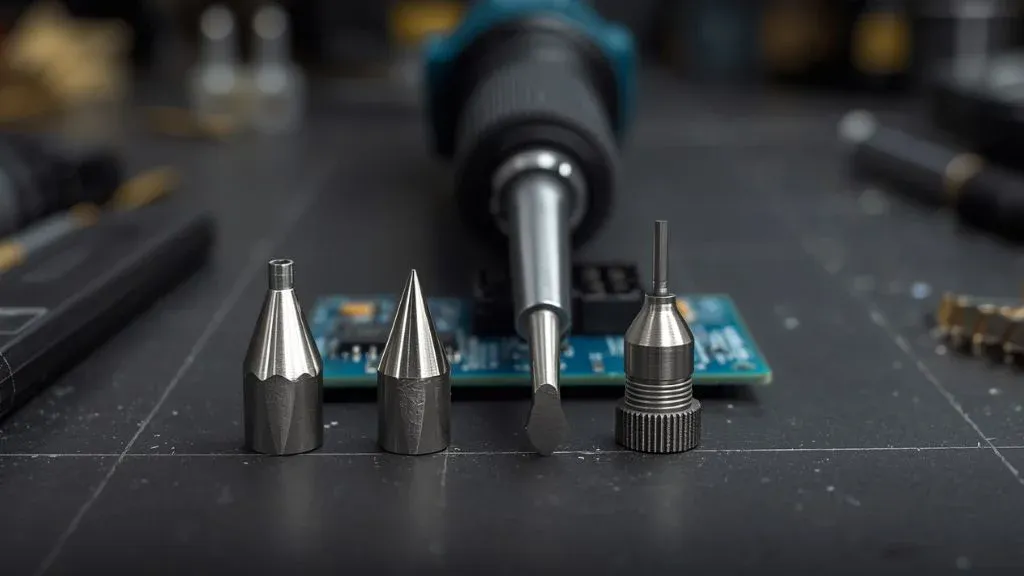
Different tip shapes are designed to control heat, solder, and access in different ways. The most useful shapes are conical, chisel, bevel, hoof, knife, and bent tips.
| Tip shape | Best suited for | Main advantage | Main limitation |
|---|---|---|---|
| Conical | Fine point work and tight spaces | Precise placement | Transfers less heat through its small point |
| Chisel | General electronics and wires | Efficient heat transfer and good control | May be too wide for very dense boards |
| Bevel | Surface-mount work and solder loading | Holds a small amount of solder | Less precise than a fine conical tip |
| Hoof | Drag soldering and SMD joints | Carries solder along multiple pins | Requires controlled movement and flux |
| Knife or blade | Drag soldering and shielded access | Long edge reaches several pins | Can bridge adjacent connections |
| Bent | Obstructed or awkward joints | Improves visibility and access | May feel less predictable at first |
The names and exact profiles can vary between manufacturers. A “hoof” tip may resemble a chisel with a curved or scooped end, while a “bevel” tip may have a slanted face. Always check the manufacturer’s profile description if the exact shape matters.
When to Use a Conical Tip
A conical tip narrows to a point. It can be useful when the solder joint is small, isolated, or difficult to reach with a wider tip.
Good uses for a conical tip
A conical tip is often suitable for:
- Fine-pitch repair work
- Small component leads
- Jumper wires
- Reworking a single solder bridge
- Reaching between closely spaced components
- Heating a very small area
The narrow point provides precise placement. This can be helpful when surrounding pads or components are close together and a wider tip would touch areas that should remain cool.
Limitations of conical tips
A conical tip is not automatically the best choice for precision work. Its small contact area can make heat transfer less efficient, especially when the joint is connected to a large copper area or ground plane.
If the tip cannot transfer heat quickly, you may compensate by increasing the temperature or holding the iron on the joint longer. That can increase the risk of damaging pads, insulation, or heat-sensitive components.
A common mistake is choosing an extremely fine conical tip for every task. The tip may look precise, but it can make ordinary joints slower and more difficult to heat.
When to Use a Chisel Tip
A chisel tip has a flat end, often with a straight or slightly rounded edge. It is one of the most versatile soldering iron tip shapes.
Why chisel tips transfer heat well
The flat face creates more contact with the joint than a pointed tip. This gives heat a more direct path into the solder, pad, and component lead.
A chisel tip can also hold a small amount of molten solder on its surface. That solder helps bridge tiny gaps between the tip and the joint, improving heat transfer during the first moment of contact.
Best applications
Use a chisel tip for:
- General printed circuit board work
- Through-hole soldering
- Wire-to-terminal connections
- Larger pads
- Power connections
- Grounded areas that need more heat
- Removing solder from moderate-sized joints
Small chisel tips are useful for compact electronics. Medium and larger versions are better for wires, terminals, connectors, and other joints that need more heat.
The tip should not be so large that it contacts neighboring pads. If it touches several connections at once, it can create solder bridges or accidentally heat nearby parts.
When to Use a Bevel Tip
A bevel tip has an angled, flat face rather than a simple point or straight end. The sloped surface can hold a small amount of solder and present it to a joint from a controlled angle.
Bevel tips are useful for:
- Surface-mount component work
- Soldering small wires
- Reworking solder joints
- Loading solder onto the tip
- Reaching joints from the side
- Controlled drag soldering
The angled face can give you better visibility than a straight chisel tip, especially when the iron handle would otherwise block the joint.
A bevel tip is also useful when you need to carry a small amount of solder to the connection. The solder should still be applied carefully. Too much solder on the tip can cause bridges, particularly on closely spaced surface-mount pads.
When to Use a Hoof Tip
A hoof tip is shaped somewhat like a small scoop or curved chisel. It can retain solder along its edge and is commonly used for drag soldering.
Drag soldering involves placing a small amount of solder and flux on the tip, then moving the tip smoothly across a row of closely spaced pins. Surface tension helps distribute solder across the connections.
A hoof tip can work well for:
- Fine-pitch integrated circuits
- Rows of surface-mount pins
- Drag soldering
- Applying solder to several related joints
- Removing or correcting small solder bridges
Using a hoof tip effectively
For drag soldering, use enough flux to help the solder flow but avoid flooding the board. Place the tip near one end of the pin row and move steadily across the pins.
If solder bridges form, adding flux and wiping the excess solder from the tip may help. A finer tip or less solder may also be necessary.
A hoof tip is not always easier for beginners. It can be efficient once you have good control of solder quantity and movement, but it may create bridges if used with too much solder or too little flux.
When to Use a Knife or Blade Tip
A knife tip has a long, narrow edge that can be used for drag soldering or for reaching joints in restricted spaces.
It may be useful for:
- Drag soldering surface-mount pins
- Desoldering several pins
- Heating a row of contacts
- Working near shielding or obstructions
- Reaching joints from a shallow angle
The long edge can contact several pins, but that also creates a greater chance of bridging adjacent connections. Use flux and a controlled amount of solder.
A knife tip is usually more specialized than a chisel or conical tip. It is most useful when its long edge solves a specific access or drag-soldering problem.
When to Use a Bent Tip
A bent tip has an angled or offset end. The bend can improve visibility and let you approach a joint from a different direction.
Bent tips can help with:
- Components located behind taller parts
- Side-entry soldering
- Difficult-to-reach pads
- Rework where the straight handle angle is awkward
- Soldering in crowded assemblies
The shape does not necessarily transfer heat better than a similar straight tip. Its main benefit is access and control.
If you cannot clearly see the joint with a standard tip, a bent version may make the work easier without requiring a wider or hotter tip.
Choose the Tip by Joint Size, Not Just Component Size
The component itself does not always determine the correct tip. The important factors include the size of the pad, the lead, the connected copper area, and the surrounding clearance.
For example, a small component may be connected to a large ground plane. That joint can require more heat than its physical size suggests. A slightly larger chisel or bevel tip may work better than a tiny conical tip.
Consider these factors:
- Pad size: Larger pads usually allow a wider working face.
- Lead spacing: Closely spaced pins require more precision.
- Copper area: Large traces and ground planes draw heat away.
- Component height: Tall parts may obstruct a straight approach.
- Access angle: A bent or bevel tip may improve visibility.
- Soldering method: Individual joints and drag soldering favor different profiles.
- Risk of contact: Nearby pads and parts limit the maximum tip width.
The best tip is normally the largest one that fits the joint safely and gives you clear control.
Tip Shape Matters More Than Tip Size Alone
A small tip is not automatically safer, and a large tip is not automatically too aggressive. Heat transfer depends on tip shape, contact area, temperature, contact time, and the thermal characteristics of the workpiece.
A very narrow tip may require longer contact because it cannot transfer enough heat. A properly sized chisel tip may heat the same joint faster at a lower or more controlled setting.
This is why choosing the smallest available tip can sometimes produce worse results:
- The joint takes longer to melt.
- The operator increases the temperature unnecessarily.
- The iron remains on the pad for too long.
- Solder does not flow evenly.
- The connection may appear dull or incomplete.
Use the tip that gives you enough thermal capacity without touching unintended areas.
Match the Tip to the Soldering Task
Different tasks favor different profiles. The following guidelines provide a practical starting point.
Through-hole components
A small or medium chisel tip is usually the most useful choice. It can heat the component lead and pad together and can handle joints larger than those found on fine surface-mount boards.
A conical tip may work for small isolated leads, but it can be less efficient on large pads or connections attached to substantial copper.
Fine surface-mount components
A small conical, fine chisel, or small bevel tip may be appropriate. The choice depends on pin spacing and whether you are soldering individual pins or working across a row.
For isolated small pads, a narrow tip provides control. For a row of pins, a bevel or hoof tip may be more efficient when used with flux.
Drag soldering
Hoof, bevel, and knife tips are commonly suited to drag soldering because they can retain a small amount of solder along an edge.
A small chisel may also work, particularly on wider-pitch pins. The best choice depends on how much solder the tip holds and how easily you can control its movement.
Wires and terminals
A medium chisel or bevel tip is generally more practical than a very fine conical tip. Wires and terminals often require more heat, and the broader working face can heat both surfaces efficiently.
For heavy wire or large metal terminals, the iron itself may not have enough heat capacity regardless of the tip shape. A larger tip can help, but it cannot overcome every limitation of the soldering station.
Ground planes and large copper areas
Use a tip with adequate thermal capacity, such as a medium chisel or bevel profile that fits the joint. Large copper areas absorb heat quickly, so a fine pointed tip may struggle.
Add flux and make sure the surfaces are clean. If the joint still does not heat effectively, the issue may be the soldering iron’s power or heat recovery rather than the tip shape alone.
Desoldering
A chisel or bevel tip can often transfer heat effectively when removing solder from larger joints. For surface-mount rework, a hoof or knife tip may help heat several pins.
Desoldering braid also works better when the iron tip can heat the braid and joint at the same time. A tip that is too small may fail to keep the braid hot enough for solder to flow.
How to Choose the Right Tip Shape
Use this process when selecting a tip for an unfamiliar job:
- Identify the joint type. Decide whether you are working on a wire, through-hole lead, individual surface-mount pad, or row of pins.
- Check the available space. Look for nearby pads, components, plastic parts, and insulation.
- Estimate the required heat transfer. Large pads, ground planes, and heavy wires generally need more thermal contact.
- Choose the broadest profile that fits. A chisel or bevel may be preferable if it can reach the joint without touching anything else.
- Consider the approach angle. Use a bent or bevel tip if the straight handle blocks your view or cannot reach the joint comfortably.
- Adjust the soldering method. Use a pointed tip for individual precise joints and a hoof, bevel, or knife profile for controlled drag soldering.
- Test on the joint briefly. The solder should melt and flow without excessive contact time. If it does not, check cleanliness, flux, temperature, tip condition, and iron capacity.
This approach is more reliable than choosing a tip solely because it appears small or precise.
Common Tip-Selection Mistakes
Choosing a needle-like tip for every job
Very fine tips are useful for tight spaces, but they are poor general-purpose tools when the joint needs more heat transfer. A small chisel often provides better control and faster heating.
Using a tip that is too large
An oversized tip can touch adjacent pads, solder multiple pins together, or transfer unwanted heat to nearby parts. If you cannot place the tip accurately, move down to a narrower profile.
Ignoring the working face
The part of the tip that contacts the joint matters more than the shape name alone. A chisel with a broad, clean face may work better than a conical tip of similar overall size.
Applying too much solder to a drag-soldering tip
A hoof or knife tip should carry a controlled amount of solder. Excess solder can create bridges and make the pin row harder to inspect.
Blaming the tip for every heating problem
Poor solder flow may result from oxidation, contaminated surfaces, insufficient flux, incorrect temperature, or inadequate iron power. Changing tip shape alone may not solve the problem.
Using a damaged or oxidized tip
A worn tip may stop accepting solder, making heat transfer less consistent. Keep the working surface properly tinned and replace the tip if the plating is damaged or the tip no longer wets correctly.
Tip Maintenance Affects Performance
Tip shape cannot compensate for poor tip condition. A clean, properly tinned tip transfers heat more consistently than a dry or heavily oxidized one.
During use:
- Keep a thin layer of solder on the working surface.
- Wipe away excess residue with an appropriate tip cleaner.
- Avoid filing or sanding a plated tip.
- Do not leave the tip dry while the iron is hot.
- Use the manufacturer’s recommended tip temperature range.
- Replace the tip when the working surface becomes badly pitted, eroded, or difficult to tin.
The tip should remain shiny or evenly coated with solder during normal work. A dark, rough, or irregular surface may indicate oxidation or damage, although appearance can vary depending on the solder and cleaning method.
Does Tip Shape Affect Soldering Temperature?
Tip shape does not create a single universal temperature for a particular soldering task. It affects how efficiently heat reaches the joint, but the required setting also depends on the solder, board, component, copper area, and soldering station.
A pointed tip with little contact area may transfer heat less effectively than a chisel tip at the same iron setting. This can make the joint behave as though the iron is underpowered.
Rather than increasing temperature immediately, first check whether:
- The tip is properly tinned.
- The working face is touching the joint effectively.
- The tip is large enough for the connection.
- The surfaces are clean.
- Flux is appropriate for the work.
- The soldering station has enough power and heat recovery.
Use the lowest practical setting that allows the joint to form efficiently, while following the requirements of the solder and materials involved.
Safety Considerations
Soldering iron tips become hot enough to cause serious burns and ignite nearby materials. Keep the hot iron in a stable stand when it is not touching the joint.
Practical precautions include:
- Work in a well-ventilated area.
- Keep the hot tip away from cables, plastic, paper, and skin.
- Use eye protection when cutting leads or removing solder.
- Secure the circuit board and parts before soldering.
- Wash your hands after handling solder, especially when working with lead-containing solder.
- Do not touch the tip, molten solder, or recently heated joint.
- Disconnect equipment from power when appropriate before soldering or desoldering.
- Allow the iron and workpiece to cool before storage.
Use only suitable soldering materials for the application, and follow the handling guidance provided with the solder and flux.
Frequently Asked Questions Of Which Soldering Iron Tip Shape Should I Use
Is a chisel tip better than a conical tip?
Neither is universally better. A chisel tip is usually more versatile and transfers heat efficiently, while a conical tip offers more precise access to small or crowded joints. For general electronics work, a small or medium chisel tip is often the better starting point.
What tip shape is best for small circuit boards?
A small chisel, fine conical, or small bevel tip can work well. Choose based on pad spacing and the amount of copper connected to the joint. The tip should fit the pad without touching nearby connections.
What soldering iron tip is best for drag soldering?
Hoof, bevel, and knife tips are commonly useful for drag soldering because they can hold a controlled amount of solder along an edge. A small chisel may also work for wider-spaced pins.
Should the tip be smaller than the solder pad?
Usually, the tip should be narrow enough to avoid nearby pads but large enough to contact the joint effectively. It does not need to be dramatically smaller than the pad. A tip that is too small may transfer heat poorly.
Why does solder stick to some parts of the tip but not others?
This can happen because of oxidation, contamination, insufficient tinning, or damage to the tip plating. Clean the tip using the recommended method and apply fresh solder. If the working surface remains difficult to wet, the tip may need replacement.
Can one soldering tip handle most electronics work?
A small or medium chisel tip can handle many general-purpose jobs, but no single shape is ideal for every task. Adding a fine conical tip for tight spaces and a bevel or hoof tip for drag soldering covers a wider range of work.
Final Takeaway
For most soldering tasks, start with a small or medium chisel tip that fits the joint without touching nearby connections. Choose a conical tip for narrow access, a bevel or hoof tip for solder loading and drag soldering, and a knife or bent tip when the joint requires a special approach angle.
The right soldering iron tip shape is the one that provides reliable heat transfer, clear access, and precise control. Fit the tip to the joint rather than automatically choosing the smallest or most pointed option.

Scott Yarnell is a tool expert focused on practical guides, product research, and real-world tool performance to help readers make informed decisions.