Why Does Solder Bridge Between Pins: Causes And Fixes
Solder bridges between pins when molten solder connects two or more nearby conductors instead of forming separate joints. The most common causes are too much solder, insufficient flux control, excessive heat, closely spaced pins, or incorrect soldering technique.
A solder bridge can create an unintended electrical connection, causing shorts, malfunctioning circuits, or damaged components when power is applied. Fortunately, most bridges can be prevented with better solder control and removed with solder wick, a solder sucker, or careful reheating.
What a Solder Bridge Is
A solder bridge is an unwanted connection between adjacent pins, pads, traces, or other conductive surfaces. It usually appears as a small blob or thin strand of solder spanning the gap between two points that should remain electrically separate.
Bridges are especially common when soldering:
- Fine-pitch integrated circuits
- Surface-mount components
- Multi-pin connectors
- Small transistor packages
- Headers with closely spaced pins
- Circuit boards with narrow pad spacing
A bridge may be easy to see, but very small connections can be difficult to detect without magnification. Even a tiny amount of solder can connect pins electrically.
Why Does Solder Bridge Between Pins?
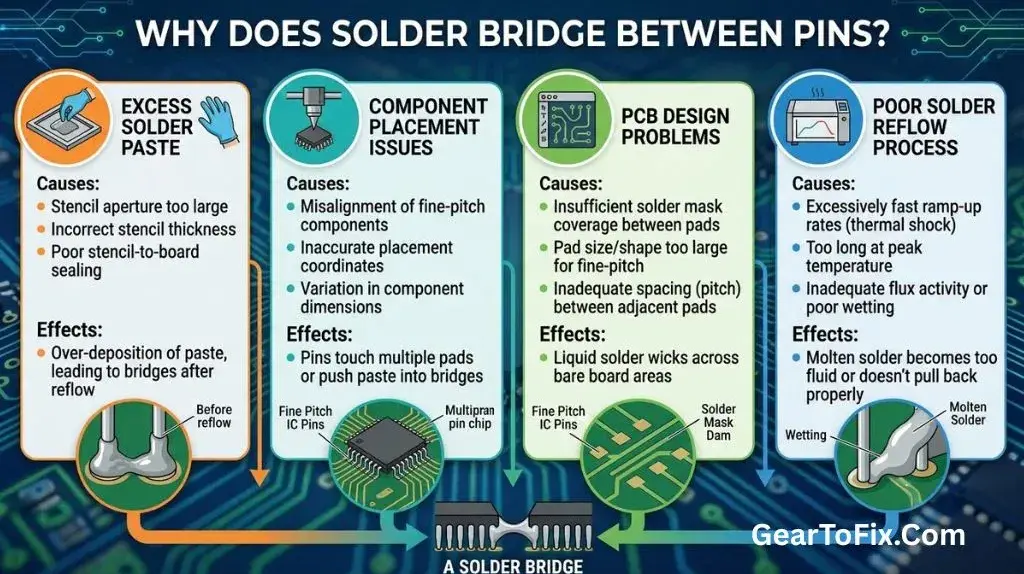
Several factors can cause solder to flow between adjacent pins. In many cases, more than one problem is involved.
Too Much Solder on the Joint
The most common cause is applying more solder than the joint needs. Once the solder melts, excess material can spread across nearby pads or pins through surface tension and capillary action.
A good solder joint generally needs enough solder to cover the pad and pin connection without forming a large mound. Adding solder continuously while the joint is already covered increases the chance that the molten material will touch the neighboring pin.
This problem is more likely when:
- The solder wire is too thick for the joint
- The solder is fed for too long
- Solder is added before the previous amount has distributed
- The tip carries a large blob of solder
- The operator tries to compensate for poor heating by adding more solder
Pins or Pads Are Too Close Together
Fine-pitch components have very small gaps between their pins. The closer the conductors are, the easier it is for a small amount of molten solder to span the gap.
The spacing may be perfectly normal for the component, but it requires more precise technique. A soldering iron tip that works well for large through-hole joints may be too large for closely spaced surface-mount pins.
Close spacing also makes bridges harder to see. Magnification and good lighting become more valuable as pin spacing decreases.
The Soldering Tip Is Too Large
A large tip can hold and transfer more solder than the joint requires. If it contacts two neighboring pins at once, solder may flow onto both and form a bridge.
A large tip is not always unsuitable. A broad tip can transfer heat efficiently, but it must match the size and layout of the work. For small pins, a fine or appropriately shaped tip usually provides better control.
An extremely fine tip can also create problems if it cannot transfer enough heat. The goal is not simply to use the smallest tip available. The tip should be narrow enough for the joint while still making effective thermal contact.
Soldering Temperature Is Too High
Excessive temperature can make solder spread quickly and unpredictably. It may also encourage the operator to leave the tip on the board longer than necessary while trying to control the flow.
High heat can damage pads, components, or the circuit board, especially when combined with prolonged contact. The correct temperature depends on the solder alloy, component, board, and soldering equipment, so there is no single setting that applies to every job.
A controlled temperature and brief, deliberate contact are generally easier to manage than uncontrolled heating.
The Tip Touches Multiple Pins
A bridge can form when the soldering tip contacts two or more adjacent pins at the same time. This is particularly common when dragging a large, solder-loaded tip across a fine-pitch component without controlling the amount of solder.
Drag soldering can be useful for some surface-mount work, but it requires:
- A suitable tip shape
- A controlled amount of solder
- Adequate flux
- Proper alignment
- Inspection after soldering
Without those conditions, the tip may pull solder across several pins.
Too Much Flux or Poor Flux Distribution
Flux helps solder wet and flow across clean metal surfaces. This is normally beneficial, but an excessive amount of molten solder combined with strong flux activity can make solder move farther than intended.
Flux itself does not usually create a solder bridge without available solder. The problem is more often the combination of excess solder, closely spaced conductors, and fluid solder flow.
Insufficient flux can also contribute indirectly. If the solder does not wet the intended pad properly, the operator may add more solder or heat while trying to complete the joint. The additional solder can then spread to neighboring pins.
Dirty, Oxidized, or Contaminated Surfaces
Oxidation, dirt, grease, and residue can prevent solder from wetting the intended surfaces evenly. Instead of forming a controlled joint, solder may collect in an irregular blob or move toward another conductive area.
A dirty soldering tip can cause similar problems. Oxidized tips transfer heat poorly and do not hold solder consistently. The result may be uneven solder flow and repeated attempts to repair the same joint.
The board, component leads, and tip should be reasonably clean before soldering. The tip should also be properly tinned, meaning it has a thin, smooth coating of solder that improves heat transfer.
The Component or Board Is Misaligned
If a surface-mount component is not centered on its pads, one pin may sit unusually close to a neighboring pad or trace. Solder can then bridge more easily during reflow or hand soldering.
Misalignment may occur because:
- The component shifted during heating
- The pads were not evenly prepared
- Too much solder was placed on one side
- The component was positioned incorrectly before soldering
- Mechanical pressure moved the part while the solder was molten
Checking alignment before solder fully solidifies can prevent a small positioning problem from becoming a larger rework issue.
Common Signs of a Solder Bridge
A visible solder connection between adjacent pins is the clearest sign, but bridges are not always obvious. Look for:
- A shiny or dull strand connecting two pins
- A rounded blob spanning neighboring pads
- Two joints that appear joined at their edges
- Uneven solder buildup on a pin row
- A component that does not operate correctly after soldering
- Unexpected continuity between pins
- A circuit that draws excessive current or immediately shuts down
Some solder joints may look connected because of flux residue or reflections. Visual inspection is useful, but it does not always confirm whether a real electrical connection exists. When appropriate, check the suspected pins with a multimeter after disconnecting power.
How to Prevent Solder Bridges
Preventing a bridge is easier than removing one after the component and board have been heated repeatedly.
Use the Right Amount of Solder
Apply solder gradually rather than feeding a long length into the joint. The solder should flow onto the heated pad and pin, not accumulate on the iron tip or spread across the entire component.
For fine-pitch work, use solder wire with a diameter that allows precise feeding. Thick solder wire can release too much material before you can stop.
A useful technique is to:
- Heat the joint briefly.
- Touch solder to the heated pad and pin.
- Feed only enough solder to form the joint.
- Remove the solder wire.
- Remove the iron shortly afterward.
The exact timing varies by board and tool, but the principle is consistent: solder should be added in a controlled amount.
Keep the Tip Clean and Properly Tinned
A clean, lightly tinned tip transfers heat more consistently than a dry or heavily oxidized one. Wipe away excess residue using an appropriate tip-cleaning method, then leave a thin coating of solder on the working surface.
Avoid carrying a large drop of solder on the tip when working between pins. A small amount may help transfer heat, but excess solder is more likely to spread.
Match the Tip to the Work
Choose a tip that can contact the intended pad or pin without unintentionally touching several neighboring connections. The best shape depends on the package and technique.
For closely spaced pins, a small chisel or fine tip may provide better control than a broad tip. A tip that is too small, though, may heat the joint slowly and encourage prolonged contact. Select a size that balances precision with heat transfer.
Use Flux Intentionally
A suitable flux can help solder wet the correct surfaces and flow evenly. Apply only enough for the task, especially when working on fine-pitch components.
Flux residue should be handled according to the type of flux and the requirements of the board. Some fluxes are designed to leave minimal residue, while others may need cleaning. Do not assume that every residue is harmless in every application.
Inspect With Magnification
Use a magnifying glass, inspection lamp, or microscope when pins are small or closely spaced. Inspect each row from more than one angle because a bridge may be hidden behind the component body or by the shape of the pin.
Good lighting is just as important as magnification. Reflections can make solder joints look connected or separate when they are not.
Apply Power Only After Inspection
Do not power a newly soldered board until suspected bridges and accidental connections have been checked. A short circuit can cause overheating or damage, depending on the circuit and its power source.
If practical, use a current-limited supply during initial testing. This does not replace inspection, but it can reduce the consequences of a fault.
How to Remove a Solder Bridge
The safest removal method depends on the size of the bridge, the component, and the board. Work carefully to avoid lifting pads or overheating the component.
Method 1: Use Solder Wick
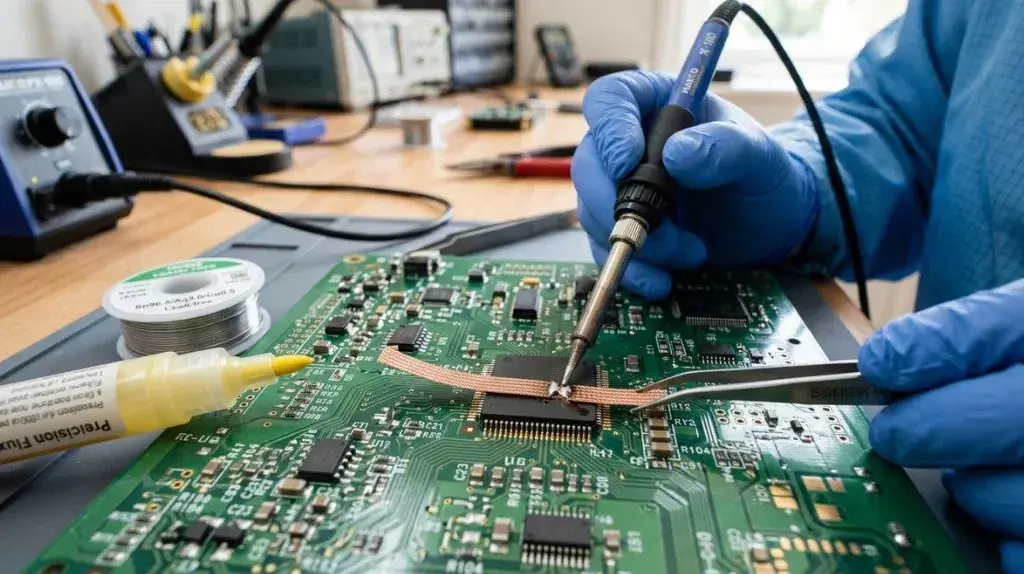
Solder wick, also called desoldering braid, is often effective for removing excess solder between adjacent pins.
- Place a short section of solder wick over the bridge.
- Position a clean, tinned iron tip on top of the wick.
- Allow the solder to melt into the braid.
- Lift the wick and iron together or in a controlled sequence.
- Inspect the pins and repeat with a fresh section if necessary.
Do not drag the wick aggressively across the board. Excessive pressure or prolonged heating can damage pads, especially on boards with small surface-mount connections.
Method 2: Use a Solder Sucker
A solder sucker can remove a larger blob of solder, although it may be less precise for very fine-pitch pins.
Heat the solder until it is fully molten, then position the solder sucker close to the liquid solder and activate it. Avoid pressing the tool into delicate pins or pads.
This method is generally more useful for larger joints and through-hole work than for extremely small surface-mount bridges.
Method 3: Use a Clean, Lightly Tinned Tip
Sometimes a small bridge can be removed by applying flux and gently drawing away excess solder with a clean tip. The iron should carry the unwanted solder away rather than push it into another gap.
This technique requires control. If the tip is overloaded or moved too quickly, the bridge may simply shift to a different pair of pins.
Method 4: Add Flux and Reflow Carefully
Adding a small amount of appropriate flux can help separate solder from adjacent pins as the joint is reheated. The solder may then move toward the pad or onto the iron tip.
Do not keep heating the component while repeatedly attempting the same correction. If the bridge does not clear quickly, allow the area to cool and use solder wick or another controlled method.
Solder Bridge Removal Problems to Avoid
Rework can create more damage than the original bridge if it is done too aggressively. Avoid these mistakes:
- Scraping pins or pads with the iron tip
- Applying force while the solder is partly solid
- Heating the same area for too long
- Pulling solder wick sideways across fragile pads
- Adding more solder without a specific reason
- Using excessive flux and leaving residue unchecked
- Testing the board while power is still connected
- Assuming a visually clear joint is electrically clear
If a pad lifts from the board, stop and assess the damage before continuing. Further heating or pulling may make the repair more difficult.
Is a Solder Bridge Always a Problem?
A bridge between separate signal or power pins is normally a problem because it creates an unintended electrical connection. However, not every visible area of solder near two conductors is necessarily a bridge. Some pads may be intentionally connected by the circuit-board design, and certain component packages use soldered tabs or exposed areas that are meant to connect electrically.
When in doubt, compare the board layout, schematic, or continuity readings rather than relying only on appearance. Never assume that two nearby pads should be electrically separate without checking the circuit design.
Can a Solder Bridge Damage a Component?
Yes, a solder bridge can damage a component or circuit, but the result depends on what the connected pins do and whether power is applied. A bridge between two unrelated signal pins may cause incorrect operation, while a bridge between power and ground can create a much more serious short circuit.
Before troubleshooting a malfunctioning board, disconnect power and inspect for bridges. If the board has already been powered, check for signs of overheating, unusual odor, damaged components, or excessive current draw before applying power again.
Why Does Solder Bridge Between Pins During Reflow?
During reflow soldering, bridges can result from excessive solder paste, inaccurate component placement, poor pad design, contamination, or an unsuitable heating profile. The solder melts and flows across the pads, and surface tension usually helps center components and separate joints. That effect is not enough to correct every printing or placement problem.
Hand soldering and reflow soldering have different causes, but the result is similar: molten solder forms an unintended connection. Fine-pitch assemblies require accurate paste application, clean surfaces, and suitable thermal control.
FAQs Of Why Does Solder Bridge Between Pins
Can too much flux cause solder bridges?
Too much flux alone does not normally create a bridge because flux is not conductive solder. However, excess flux can make a large amount of solder flow more easily, especially when the tip or joint already contains too much solder. Use enough flux to improve wetting without flooding the work area.
Should I add more solder to separate a bridge?
Usually, no. Adding more solder often makes the bridge larger. A better approach is to apply flux and remove the excess with solder wick, a clean tip, or another suitable desoldering method.
Can a solder bridge be invisible?
Yes. A very small bridge may be difficult to see, especially under a component or between fine-pitch pins. Magnified inspection and a continuity test with power disconnected can help confirm whether adjacent points are electrically connected.
Why does solder stick to the neighboring pin instead of the intended pad?
This can happen when the neighboring surface is cleaner, hotter, closer to the tip, or more effectively wetted by flux. Poor pad wetting, contamination, misalignment, and excessive solder can all contribute. Cleaning the surfaces and using controlled heat and solder flow usually improves the result.
Is a dull solder joint automatically a solder bridge?
No. A dull joint may be caused by the solder alloy, surface condition, or movement while the solder was cooling. A bridge is defined by an unintended connection between conductors, not simply by the appearance of the solder surface.
How can I check for a bridge before powering the board?
Inspect the joints under good lighting and magnification, then use a multimeter with the board unpowered. Check for unexpected continuity between adjacent pins, while remembering that the circuit itself may intentionally connect some points.
Final Takeaway
Solder bridges between pins mainly result from excess solder, close pin spacing, poor tip control, insufficient inspection, or surfaces that do not wet properly. Use a suitable tip, a controlled amount of solder, clean surfaces, and enough flux to promote even flow.
If a bridge appears, remove power before correcting it. Solder wick and careful reflow are usually effective, but avoid prolonged heating or force that could damage the pads. A careful visual inspection followed by an unpowered continuity check is the best way to confirm that the unwanted connection has been removed.

Scott Yarnell is a tool expert focused on practical guides, product research, and real-world tool performance to help readers make informed decisions.