How To Replace A Soldering Iron Tip: Quick Step-By-Step Guide
Replacing a soldering iron tip is usually a simple maintenance task, but the method depends on the iron’s design. Most tips are either secured by a threaded collar, a retaining sleeve, or a friction fit over the heating element. In every case, turn the iron off, unplug it, and let it cool completely before removing the old tip unless the manufacturer specifically provides a different procedure.
A worn or damaged tip can cause poor heat transfer, uneven solder flow, and unreliable joints. The right replacement tip should match the soldering iron’s model or tip system, not just its general shape. This guide explains how to identify the tip, remove it safely, install the replacement, and prepare it for use.
What You Need Before Replacing the Tip
Gather the following items before starting:
- A compatible replacement soldering iron tip
- The soldering iron’s retaining collar, sleeve, or securing hardware
- A suitable screwdriver or wrench if the design requires one
- Brass tip-cleaning wool or a damp cleaning sponge
- Solder for tinning the new tip
- A heat-resistant work surface
- Safety glasses when there is a risk of solder splash or debris
Check the soldering iron’s manual, markings, or replacement-tip information before buying a new tip. Two tips may look similar but use different diameters, lengths, heating-element connections, or retention methods.
Check Tip Compatibility
The replacement tip should be compatible with:
- The soldering iron model or tip series
- The diameter of the heating element or barrel
- The retaining sleeve or collar
- The operating temperature range
- The intended soldering task
A tip that is too loose may transfer heat poorly or become unstable. A tip that is too tight may be difficult to remove and could damage the heater or barrel.
Tip shape also matters. A chisel tip generally transfers heat well across larger joints, while a conical tip can provide better access in tight spaces. However, shape does not compensate for an incompatible mounting system.
How to Replace a Soldering Iron Tip Safely
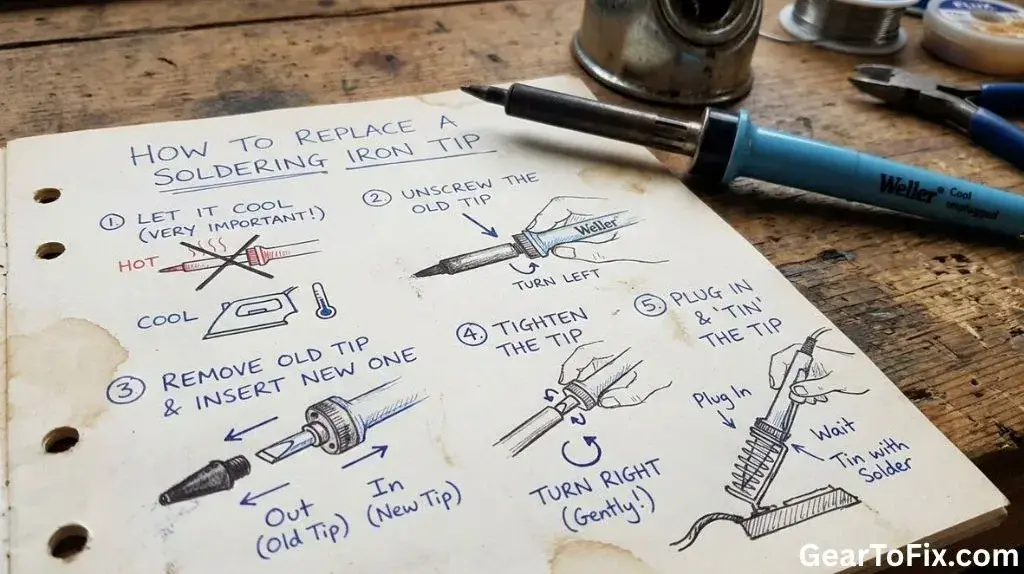
The basic process is to disconnect the iron, remove the retaining hardware, slide off the old tip, clean the contact area, install the new tip, and tin its working surface.
1. Turn Off and Unplug the Soldering Iron
Switch off the soldering iron and disconnect it from the power source. Place it on a heat-resistant stand and wait until the tip and surrounding metal are cool enough to handle safely.
Do not rely only on the power switch. Some irons may remain connected to mains power even when switched off, and the metal parts can stay hot for several minutes.
2. Let the Iron Cool Completely
Allow the iron to cool naturally. Avoid dipping the hot tip in water or placing it against a cold surface to speed up cooling. Rapid temperature changes can stress components, and water may create a burn hazard from steam.
Some professional soldering stations use replaceable tips designed for removal while warm. If your manufacturer specifically instructs you to change the tip at a certain temperature, follow those instructions. Otherwise, a cold replacement is the safer general method.
3. Remove the Retaining Collar or Sleeve
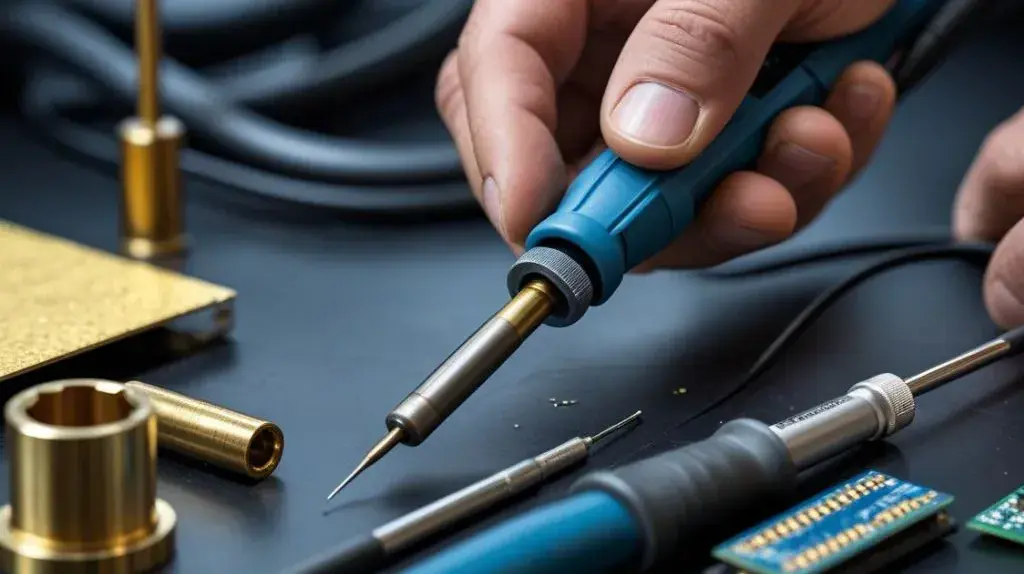
Look at the area where the tip enters the soldering iron. A removable collar, nut, or sleeve may hold the tip in position.
Depending on the design, you may need to:
- Unscrew a threaded retaining collar by hand
- Loosen a collar with the correct tool
- Slide a retaining sleeve away from the tip
- Pull the tip straight out after removing a spring or clip
Use only moderate force. If the collar is stuck, do not grip the heating element aggressively with pliers. Crushing or bending the heater assembly can permanently damage the iron.
4. Remove the Old Tip
Once the retaining hardware is loose, pull the tip straight off the heating element or out of the barrel.
If the tip does not move easily, corrosion or oxidized solder may be holding it in place. Do not twist forcefully, pry against the heater, or use excessive leverage. Recheck that all retaining hardware has been removed and consult the tool’s instructions if the tip remains stuck.
Some tips become seized because solder and oxidation collect between the tip and the heater. In that situation, forcing the tip may damage the heating assembly. Replacement of the complete heater or professional service may be necessary.
5. Clean the Contact Area
With the old tip removed and the iron cool, inspect the exposed heater or barrel. Remove loose oxidation and residue carefully with a dry cloth or a cleaning method approved for the tool.
Do not sand, file, or scrape a plated heating element unless the manufacturer specifically allows it. Many soldering iron tips and heater assemblies have protective coatings that can be damaged by abrasives.
The contact area should be reasonably clean and free of loose debris. It does not need to look bright or polished.
6. Install the New Tip
Slide the replacement tip onto the heating element or into the barrel. Push it in until it reaches its normal seated position.
Do not force it beyond that point. The tip should fit firmly without being hammered, twisted aggressively, or clamped with excessive pressure.
If the tip has a specific orientation, align it as instructed. Most round tips can be installed in any rotational position, but some specialized tips or cartridges may have a defined alignment.
7. Reinstall and Tighten the Retaining Hardware
Replace the collar, sleeve, clip, or other retaining part. Tighten a threaded collar only enough to hold the tip securely.
Over-tightening can make future removal difficult and may damage the threads, barrel, or heater. If the retaining part is designed to be hand-tightened, do not use pliers unless the manufacturer specifically calls for a tool.
8. Heat the Iron and Tin the New Tip
Reconnect the soldering iron and allow it to reach its normal operating temperature. Apply a small amount of solder to the working surface once it is hot enough to melt solder easily.
This process is called tinning. A thin coating of molten solder helps protect the tip’s plated surface and improves heat transfer. The tip should have a light, even coating rather than a large blob of solder.
After tinning, wipe away excess solder with brass wool or a slightly damp sponge designed for soldering work. Avoid repeatedly scrubbing the tip aggressively, because excessive cleaning can shorten its service life.
How to Tell Which Type of Tip Your Iron Uses
Soldering irons use several tip-retention designs. Identifying the design helps prevent damage during removal.
| Tip design | How it is held | Typical removal method | Main caution |
|---|---|---|---|
| Threaded or collar-held tip | A threaded collar or nut | Remove the collar, then pull the tip straight off | Do not overtighten the collar |
| Sleeve-held tip | A removable metal sleeve surrounds the tip | Slide or unscrew the sleeve, then remove the tip | Avoid gripping the heater |
| Friction-fit tip | The tip fits directly over the heater | Pull it straight off once cool | Do not twist or force a seized tip |
| Cartridge tip | Heater and tip are combined in one unit | Release the cartridge according to the tool design | Use the correct cartridge type |
The exact construction varies among soldering irons and stations. If there is no visible retaining collar, the tip may be part of a cartridge assembly or may fit directly over the heater.
Why a Soldering Iron Tip May Be Difficult to Remove
A tip that will not come off is often stuck because of oxidation, old solder, or overheating. The problem can also result from tightening the retaining collar too much.
Common causes include:
- The tip was left installed for a long time
- Molten solder entered the gap and solidified
- The tip was operated at an unnecessarily high temperature
- Flux residue and oxidation accumulated around the joint
- The retaining collar was overtightened
- The wrong tip was installed previously
Before applying force, make sure the iron is unplugged and cool, then confirm that you are removing the correct part. If the tip remains firmly seized, forcing it can turn a simple tip replacement into a heater or barrel replacement.
Common Mistakes When Replacing a Tip
Installing an Incompatible Tip
A tip that physically fits may still be unsuitable for the iron. Differences in length, diameter, heater contact, or retention design can affect heating and stability.
Use the manufacturer’s tip series or a replacement clearly identified as compatible with the tool.
Removing the Tip While It Is Hot
Handling a hot tip creates an obvious burn risk, and removing it hot may damage the heater or retaining parts. Unless the tool’s instructions specifically describe hot removal, allow the iron to cool first.
Using Pliers Directly on the Tip
Pliers can crush or scratch the tip’s plated surface. They can also transfer force to the heater assembly. If a tool is necessary, use the correct wrench or holder and apply only the force recommended for the design.
Over-Tightening the Retaining Collar
A retaining collar does not need to be extremely tight. Excessive force can damage threads and make the next replacement more difficult.
Operating a New Tip Without Tinning It
A dry, untinned tip can oxidize quickly and may transfer heat poorly. Apply a small amount of solder as soon as the new tip reaches working temperature.
Filing or Sanding the Tip
Modern soldering iron tips commonly use a plated working surface. Filing or sanding that surface can remove protective layers and cause rapid deterioration. Replace the tip instead of reshaping it with abrasives.
Leaving the Tip Bare During Storage
When the iron is hot, leave a small coating of solder on the working surface. This helps limit exposure to air and oxidation. Clean off heavy residue when necessary, but do not store a hot tip completely dry.
What to Do If the New Tip Does Not Heat Properly
A new tip that heats poorly may not be fully seated or may not be compatible with the soldering iron.
Check the following:
- Disconnect the iron and allow it to cool.
- Confirm that the replacement tip is the correct type.
- Check that the tip is pushed fully into its normal position.
- Inspect the retaining collar or sleeve for damage.
- Look for oxidation or debris preventing proper contact.
- Reinstall the tip without excessive force.
- Test the iron again after it reaches operating temperature.
If the handle heats but the tip remains cool, the tip may not be contacting the heater correctly, or the heater assembly may have a fault. If the iron does not heat at all, the issue may involve the power supply, control station, cord, switch, or heating element rather than the tip.
Do not bypass temperature controls or modify the heater to force it to operate. A faulty soldering iron should be repaired or replaced according to the manufacturer’s guidance.
How to Maintain the Replacement Tip
Proper maintenance can extend tip life and improve soldering performance.
- Keep the working surface lightly tinned during use.
- Remove excess solder with brass wool or a suitable damp sponge.
- Avoid leaving the iron at a high temperature when it is not needed.
- Use flux appropriate for the soldering task.
- Do not use the tip to pry, scrape, bend leads, or move components.
- Keep the tip seated correctly in the heater assembly.
- Replace the tip when the working surface becomes badly pitted, uneven, or difficult to wet with solder.
A tip is considered difficult to wet when solder repeatedly beads up instead of flowing across the surface. Cleaning may help with light oxidation, but a heavily damaged or worn tip should be replaced.
When Should You Replace a Soldering Iron Tip?
Replace the tip when cleaning and tinning no longer restore normal solder flow or heat transfer. Warning signs include:
- Deep pits or holes in the working surface
- Severe discoloration that does not improve with cleaning
- A misshapen or worn point
- Solder refusing to wet most of the surface
- Persistent poor heat transfer
- A loose fit on the heater
- Cracks or damage to the tip plating
Tip wear is affected by temperature, solder type, flux, cleaning habits, and how the tip is used. A tip used for heavy joints may wear differently from one used for small electronic connections.
FAQs Of How To Replace A Soldering Iron Tip
Can I replace a soldering iron tip while the iron is hot?
Only if the manufacturer specifically provides instructions for changing that tip while hot. For most general-purpose soldering irons, unplug the tool and let it cool before removal. Hot replacement creates a burn hazard and can damage the heater or retaining hardware.
Why is my replacement soldering iron tip loose?
The tip may be the wrong size or type, may not be fully seated, or may require a retaining collar or sleeve that has not been installed correctly. Do not try to secure a loose tip with foil, wire, or other improvised materials. Use the correct replacement and retaining hardware.
Should I put solder on a new soldering iron tip?
Yes. Once the new tip reaches operating temperature, apply a small amount of solder to create a thin protective coating. This is called tinning and helps the tip transfer heat and accept solder more effectively.
Can I clean a soldering iron tip with sandpaper?
Usually, no. Sandpaper, files, and abrasive tools can remove the plated surface that protects the tip. Use brass tip-cleaning wool or a suitable damp sponge, and replace the tip if the working surface is badly damaged.
What should I do if the old tip is stuck?
Confirm that the iron is unplugged and cool, then check that every retaining part has been removed. Do not use excessive force or clamp the heater with pliers. If oxidation has seized the tip in place, follow the manufacturer’s service instructions or have the heater assembly serviced.
Do all soldering iron tips fit every soldering iron?
No. Tips vary by diameter, length, heater interface, retention method, and model series. A tip must be compatible with the specific soldering iron or station. Shape alone is not enough to establish compatibility.
Final Takeaway
To replace a soldering iron tip, unplug the iron, let it cool, remove the retaining collar or sleeve, pull off the old tip without forcing the heater, and install a compatible replacement. After the iron heats, tin the new tip with a light coating of solder.
The most important precautions are choosing the correct tip, avoiding excessive force, and protecting the plated working surface. If the new tip remains loose, heats poorly, or will not seat correctly, stop using the iron until its compatibility and heater assembly have been checked.

Scott Yarnell is a tool expert focused on practical guides, product research, and real-world tool performance to help readers make informed decisions.